9. Getting Help with Commands
📚 The Manual System
🔍 Basic Help Commands
| Command |
Purpose |
man <command> |
📖 Full manual page for a command |
man -k <keyword> |
🔍 Search manual pages by keyword |
apropos <keyword> |
🔎 Same as man -k |
<command> --help |
❓ Quick help summary |
<command> -h |
💡 Short help (some commands) |
💻 Using man Pages
Examples
# 📖 Get help for any command
man ls          # Learn about 'ls' command
man cp          # Learn about 'cp' command
man mv          # Learn about 'mv' command
man chmod       # Learn about 'chmod' command

# 🔍 Search manual pages
man -k copy     # Find all commands related to "copy"
apropos file    # Find all commands related to "file"

# ❓ Quick help
ls --help       # Quick reference for 'ls'
cp --help       # Quick reference for 'cp'
grep --help     # Quick reference for 'grep'
🖥️ Visual Examples
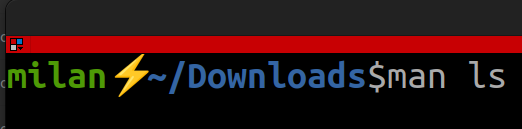
### Opening a Manual Page
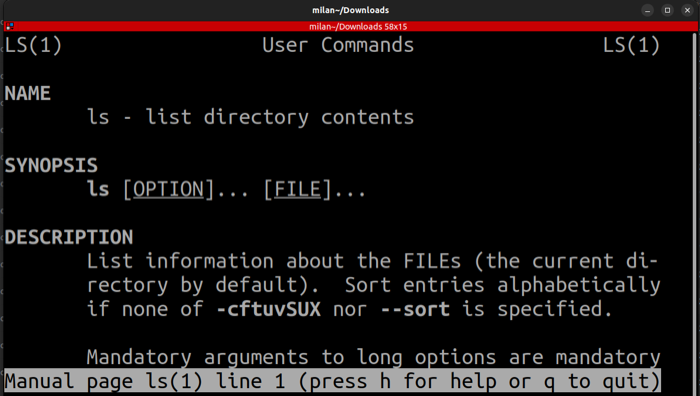
### Reading the ls Manual
🎮 Navigating man Pages
Keyboard Shortcuts
| Key |
Action |
Icon |
| Space |
⬇️ Scroll down one page |
|
| b |
⬆️ Scroll up one page |
|
| Enter |
⬇️ Scroll down one line |
|
| ↑ ↓ |
⬆️⬇️ Scroll line by line |
|
| /pattern |
🔍 Search forward |
Type / then search term |
| n |
⏭️ Next search result |
|
| N |
⏮️ Previous search result |
|
| h |
❓ Help within man |
|
| q |
🚪 Quit |
|
📋 man Page Structure
Typical Sections
| Section |
Description |
Content |
| NAME |
🏷️ Command name |
Brief description |
| SYNOPSIS |
📝 Usage syntax |
How to use the command |
| DESCRIPTION |
📖 Full description |
Detailed explanation |
| OPTIONS |
⚙️ Available options |
All flags and parameters |
| EXAMPLES |
💡 Usage examples |
Common use cases |
| SEE ALSO |
🔗 Related commands |
Links to related topics |
🎯 Quick Help vs Full Manual
📄 --help |
📚 man |
|
**Best for:**
- ✅ Quick reference
- ✅ Syntax reminder
- ✅ List of options
- ✅ Fast lookup
**Example:**
```bash
ls --help
# Shows: brief summary
```
|
**Best for:**
- 📖 Detailed documentation
- 📖 Complete explanation
- 📖 Usage examples
- 📖 Deep understanding
**Example:**
```bash
man ls
# Shows: full manual
```
|
💡 Pro Tips
# 🎯 Tip 1: Find command by description
apropos "list directory"

# 🎯 Tip 2: Search within man page
# Press '/' then type search term, press Enter

# 🎯 Tip 3: Save man page as text file
man ls > ls-manual.txt

# 🎯 Tip 4: Get specific section
man 5 passwd    # Section 5 of passwd (file format)
man 1 passwd    # Section 1 of passwd (command)
Navigation
Next: → Practical Exercises
Previous: ← Essential File Commands
Lesson Home: ↑ Lesson 2: The Shell
Course Home: ⌂ Introduction to Linux